
"Import Failed" Is Not an Error Message
A customer uploads 1,000 rows.
997 are valid.
Three contain bad data.
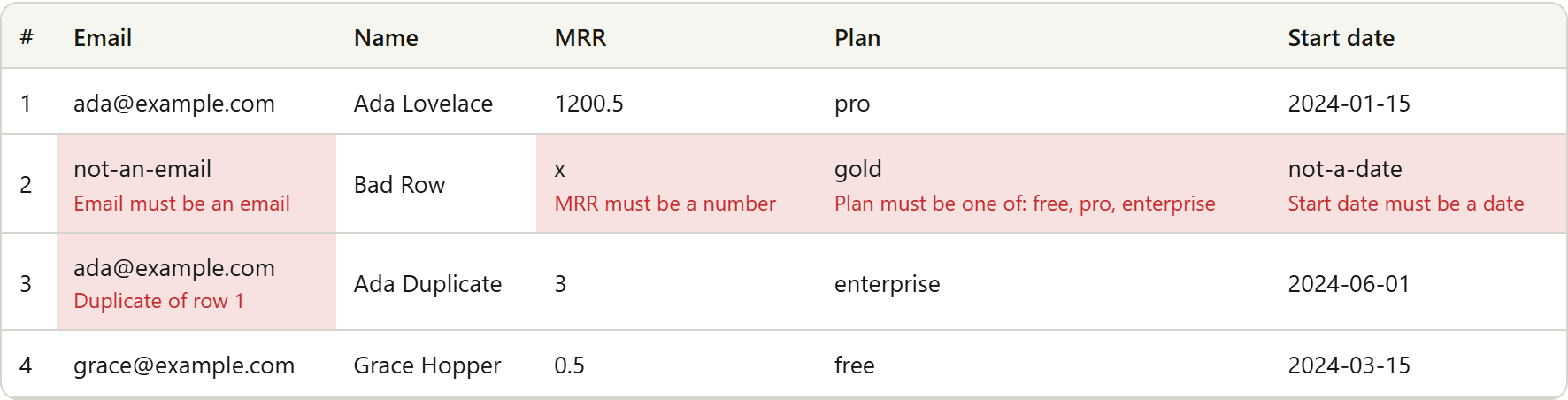
A bad import experience says: Import failed.
A useful import experience says: 997 rows are ready. Three rows need attention.
That difference matters.
Invalid rows are normal
If customers provide spreadsheets, invalid rows are not an edge case.
They are the job.
You will see missing required values, malformed email addresses, text in numeric fields, unsupported enum values, dates that cannot be interpreted, duplicate keys, blank rows, and accidental headers inside the dataset.
The importer should expect these things instead of treating them as exceptional failures.
Show the problem where the user can fix it
If row 184 has an invalid email, the UI should identify the row, the field, the offending value, and the validation rule that failed.
For example: Row 184 · Email · maria@example · Invalid email address.
The user should not need browser devtools, a support ticket, or a database error to understand that.
Bootstrapware shows inline errors in preview (first 100 rows rendered; full-file counts) and can download import-errors.csv with field columns plus an Errors column.
Do not hide the good rows either
A useful importer distinguishes between valid rows, invalid rows, and file-level failure.
A malformed file may genuinely be unusable.
A handful of bad rows inside an otherwise valid file is different.
Import sends valid rows only to onComplete. Your product still decides whether a partial import is acceptable.
Give them the bad rows back
Failed-row export is deliberately boring and useful.
If 40 rows need correction, the customer can download those rows, fix them in the spreadsheet tool they already know, and try again.
That is often a better experience than forcing them to edit dozens of cells inside your SaaS.
Bootstrapware Importer includes this kind of workflow because "parse CSV" was never the actual problem.
Related: Importer · Errors · Error export · Validation · Validate before insert